Post Multiple Registers in Sales
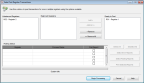
You can use the Sales Post Register Transactions window to post transactions for one or multiple balanced registers. If registers appear in the Unbalanced Registers list box, you can double-click the register to open the Sales Balance Point of Sale Register window to balance the register. You can choose to post all registers at once or select certain registers to post.
Click thumbnail for larger view of image.
Refer to the
Sales help for more information about this feature.